Hidden Tana Feature: Formula Fields
If you’re just interested in the how-to – you can jump past my context.
If you’re just looking for the formula function reference, you can jump to that, too.
Tana Outliner is a pretty cool piece of note-taking/“personal knowledge management " software – despite their heavy advertisement of AI interactivity – which manages mostly to deliver on the promise of letting you do very little work regarding data capture, while still making data retrieval possible.
It’s nowhere near as “infinitely flexible” as tools like Obsidian; but in trading off that flexibility, it also frees you from thinking of things like “Where in my filesystem did I put that note?”. Instead, it’s an ad-hoc “knowledge database” that successfully shapes relations around small bits of trivial data entry.
This database model makes you feel like Tana should be the kind of database you can easily query for things like “How much money did I spend on projects that I started but didn’t finish, this year?”, or – if you’re like my wife – “How many Smash matches did I win while playing as Corrin?”.
Tana features live search nodes that can help you do simple queries like “show all of the notes tagged #project with a status field set to unfinished and a start date within this year, and sum the cost column”; and that usually works pretty well – but it doesn’t given you much control over how the data is displayed, or allow you to have fields that are based on the values of other fields. This seems like a pretty glaring omission, especially when you look at the competition from omnipresent products like Notion.
Luckily, most of Tana’s internal features are implemented in Tana, even when they’re not quite surfaced that way. That means that we can take advantage of the same internals that drive things like Tana’s Live Search – and its sum columns to squeeze a bit more out of Tana.
Formula ‘Fields’
To accomplish fields whose values are based on other fields, we’ll start off by creating a Tana field, e.g. by using the shortcut ‘>’ on a new node. Then, we’ll do something that’s surprisingly well-surfaced for how undocumented it is: we’ll open the command palette (e.g. with Ctrl+K or Cmd+K) and then select “Set Formula = Yes”.

Note that this field no longer has a value to be edited: while we can give it a title, the area to the right of the ‘fx’ show formula button has changed into something that will – in a moment – show the output of the formula we’re creating.
The real magic happens when we click that show formula button – and the field suddenly becomes editable again. Now, instead of entering normal data, Tana will process each node as a string function name; with function arguments provided as children of the node containing the function name. Spoiler alert: the available functions aren’t documented in Tana, but I’ve documented them below.
Let’s say we had two existing fields – we’ll call them rectangle length and rectangle width – and we wanted to compute the rectangle area, which we can get by multiplying these two fields together. We’ll use the multiply function, which we can enter by typing in the multiply function ( or its shorthand of a single *) as our function node:
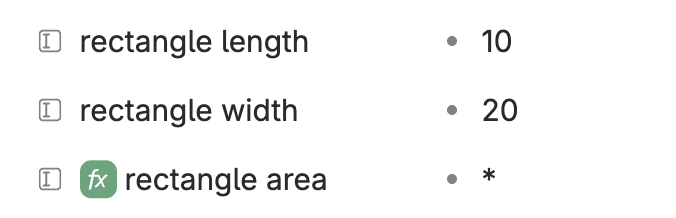
This function node will multiply any values present in its children – which can be any of three things:
- constant values, which we enter in directly, such as
3.1415; - references to values, which we enter in as typical Tana node references; or
- additional functions, which then can have their own arguments as their own children.
In our example, we’ll add in two references to the field values captured above by holding alt (option on macOS) and dragging the field values into our formula:
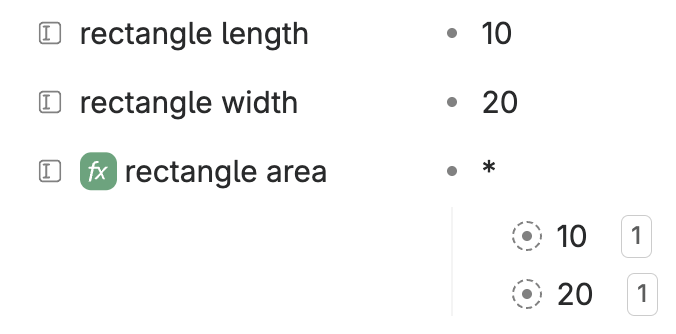
If we then exit formula-entry mode by clicking the show formula button again, we’re now greeted with a cheerful multiplication of our two values:
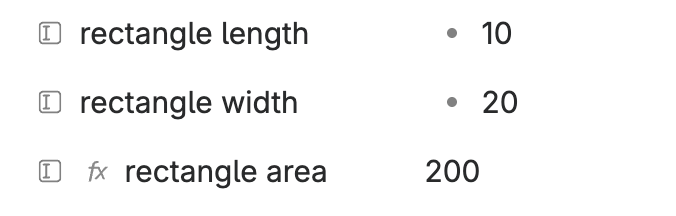
Of course, this isn’t nearly as useful as it could be – since those references always refer to those two particular field values. What if we want to use this in a template, e.g. in the content we specify for a supertag?
Referencing other Fields
Fortunately, Tana has functions that allow us to look up the value of a particular field on a relevant node, which is aptly named lookup. Instead of the direct references to our field values, we can return to show formula mode, and insert a node with the text lookup:
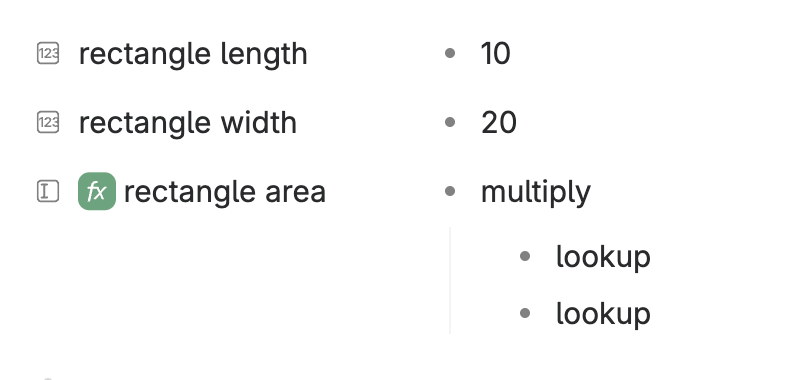
Note: I’ve used multiply instead of an asterisk, here – but the two are aliases, and thus equivalent. You can use either one, and in this document I’ll alternate between them to drive that point home.
Since lookup is a function that takes an argument itself, we’ll need to child nodes to each lookup indicating which field we’d like to get the value of. These require field references – which we can get in one of two ways:
- We can start the child node with the
@symbol, opening an autocomplete dialog that will help us search for the field reference; or - We can click on the relevant field, open the command palette, and then select Copy node link. We can then paste the copied reference into our target field.
We’ll add field references to our length and width fields, each specified as children (‘arguments’) of our lookup function node:
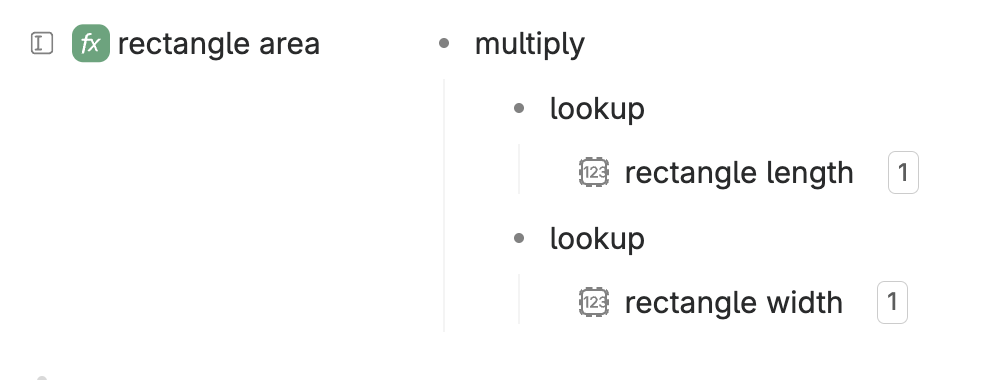
If we exit show formula mode, we now have successfully computed the area of our rectangle – and using only the local field values!
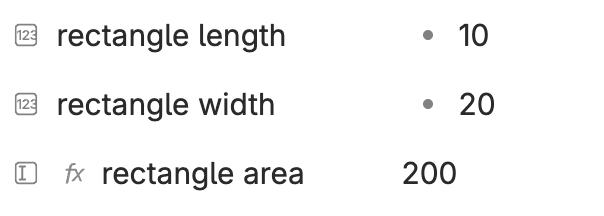
Note: technically, lookup takes two arguments as child nodes; but the second is optional. Helpfully, if not provided, it defaults to referencing the parent node that our formula field belongs to; equivalent to providing the SELF function defined below as our second argument.
Formulas work live
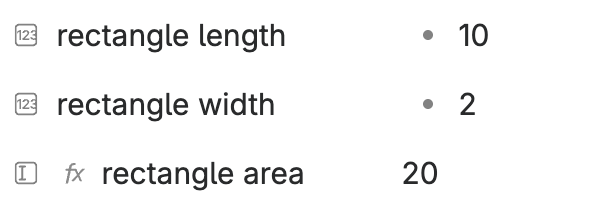
A cool feature of formula fields is that the work live – which means that if we click on after our rectangle width of 20 and backspace away the last zero, Tana instantly updates our derived field:
Formulas can reference formulas
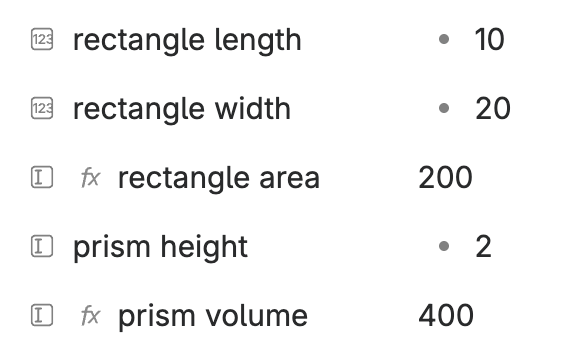
Another cool feature of formula fields is that they’re still fields – which means we can use them directly in other computations. So, if we wanted to, we could easily figure out the volume of a prism with a base of this rectangle:
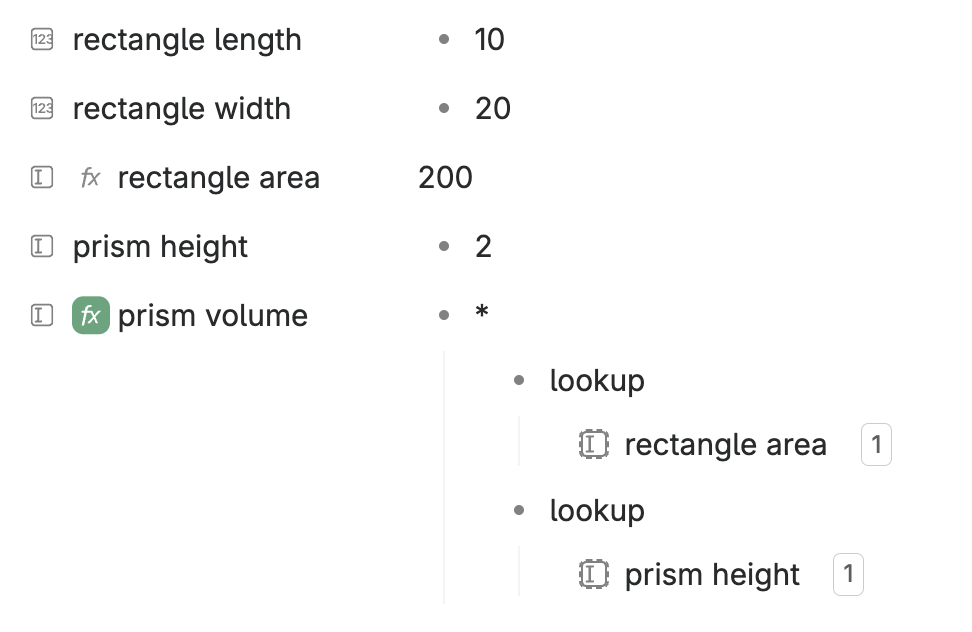
If we exit out of show formula mode, we can see that everything’s worked exactly as we’d hoped:
Formula Functions
Unfortunately, as mentioned above, formula node functionality is currently entirely undocumented. To make up for that, I’ve copy-pasted my own notes on how each of the various formula functions work, exported directly from my Tana workspace:
The order here is preserved from the way they’re defined in Tana’s javascript; which seems to group related functions.
The following functions seem to exist on formula nodes, with child nodes being their arguments. Functions are a node with that contains only their name as a string, any child nodes on the function node are taken as arguments.
top- returns the first N elements from an array, such as returned bychildrenOf- first parameter: N, the number of children to return
- second parameter: the array to return the elements from
first- alias fortop; returns the first N elements from an array- first parameter: N, the number of children to return
- second parameter: the array to return the elements from
pickRandom- picks a random element from an array; re-computed on every evaluation- first parameter: the array to select from
bottom- returns the last N elements from an array- first parameter: N, the number of children to return
- second parameter: the array to return the elements from
last- alias forbottom, returns the last N elements from an array- first parameter: N, the number of children to return
- second parameter: the array to return the elements from
sum- summates all child values, flattening all values firstsubtract- subtracts all values after the first from the first value, flattening all values firstcount- counts the number of children, flattening all values firstmax- returns the highest child value, flattening all values firstmin- returns the lowest child value, flattening all values firstaverage- returns the average of all children, flattening all values firstmean- alias foraverageround- rounds the only child argument to the nearest whole number- first argument: ****the number to round
+- alias forsum-- alias forsubtractmultiply- multiplies all children; accepts only a flat set of child nodes*- alias for multiplydivide- divides the first child by each of the remaining values, in order/- alias fordividefindInstance- finds all nodes of a given type (e.g. supertag or base type) which exist either above (parent-wards) or below (child-wards) the given node- first child: a reference to the type we’d like to search for; e.g. a reference to a supertag
- second child: sets the search direction; either the string ABOVE or BELOW
- third child: the node to search with respect to; defaults to SELF
findFieldValues- finds the field value for all fields either above (parent-wards) or below (child-wards) the given node- first child: a reference to the field we want to get the data for
- second child: sets the search direction; either the string
ABOVEorBELOW - third child: the node to search with respect to; defaults to
SELF
findInstances- finds all instances of a given item; i.e. all nodes that have a tag, or all instances of a given field- first child: a reference to the supertag (or base type) that we want to search for, or a reference to the field we want to find instances of
lookup- looks up the value of a given field on a provided node, as a value string- first child: a reference to the field we want to get the data for
- second child: a reference to the node we want to look for fields on, or an array of such references; defaults to SELF
lookupField- looks up a field’s contents __given a reference to it; whilelookupwill return the field’s value,lookupFieldwill return a reference to those contents- first child: a reference to the field we want to get the data for
- this can be gotten with CTRL+K, then copy link to node
- this can also be an attr id, as given in the schema view, or a function that yields a reference
- second child: a reference to the node we want to look for fields on, or an array of such references; defaults to
SELF
filter- filters a list of nodes using a search query- first argument: an array of nodes to run the filter on
- second argument: a search expression to apply to the given set of nodes, exactly as you would enter it into the search query builder, except as a single node
- “except as a single node” here means that there’s no automatic top-level AND, so you’ll need to add that in yourself if you want to AND together multiple conditions
- it’s likely easiest to build the query as a single (e.g. AND) node there, and then move it over
childrenOf- resolves references to all children of a given node- first child: a reference to the node we want to get the children of
- this can be gotten with CTRL+K, then copy link to node
- this can also be an attr id, as given in the schema view for API, or a function that yields a reference
nodesBelow- resolves references to all nodes below a given node; i.e. finding the children of a given node, and their children, and so on recursively. maintains structure- first child: a reference to the node we want to get the children of
SELF- yields a reference the parent node for the field whose formula is being setCREATED- returns the creation time for SELF- first child: format string, as in Tana’s other date format strings
CURRENT_USER- returns the login for the current userCURRENT_USER_REF- returns a reference to the current userCURRENT_DATE_REF- returns a reference to the current date; re-computed on every evaluationCURRENT_DATETIME_REF- returns a reference to the current time; re-computed on every evaluationconcat- concatenates together the values from all provided arraysstrlen- returns the number of characters in the child node- first child: the node to get the string length of; child nodes of this node are ignored
blockFilter- inverted variant offilter; returns all nodes for which a given search expression does not match- first argument: an array of nodes to run the filter on
- second argument: a search expression to apply to the given set of nodes, exactly as you would enter it into the search query builder, except as a single node
uniq- filters an array, returning unique array elements; note that this is done by reference, rather than by value- first child: the array to be filtered
backlink- find all nodes with a given field (“F”) that references the given node (“N”)- first child, “F”: a reference to the field which will be searched for references to the given node
- second child, “N”: the node to be searched for; defaults to
SELF
ownerOf- returns the owner for the given node (every Tana node has a single owner, where it conceptually resides, even if it’s referenced in multiple parents)formatDate- formats a given date- first child: the date to format, which should be a parseable date string, rather than as a reference
- second child: the format string, as in Tana’s other date format strings
emojiCount- counts the number of emoji in a single node; child nodes are ignored- first argument: the node to count emoji from